
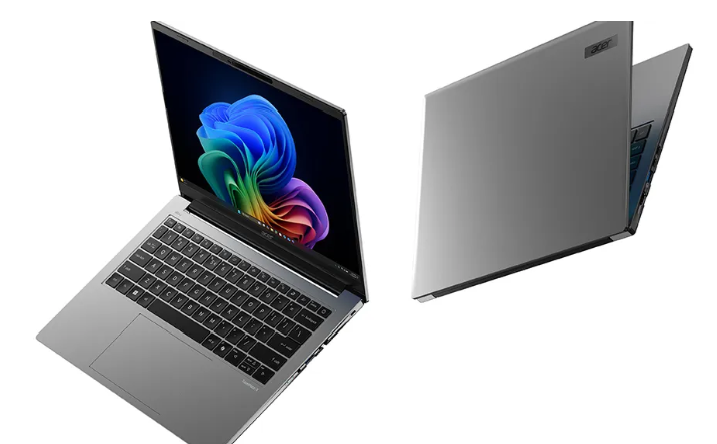

ACER TravelMate X4 14 AI 2025 Complete Guide: Specifications, Features & All Drivers Download FREE
ACER TravelMate X4 14 AI 2025 – Ultimate Business AI Laptop
The ACER TravelMate X4 14 AI (TMX414-51) is a cutting-edge business laptop powered by Intel Core Ultra processors with AI capabilities. Designed for professionals and SMBs, this Copilot+ PC delivers exceptional performance, portability, and security in a sleek, lightweight package.
✨ Key Specifications
- Processor: Intel Core Ultra 7 258V (up to 115 TOPS AI performance)
- Display: 14-inch WUXGA (1920×1200) IPS or OLED (120Hz, 500 nits, 100% DCI-P3)
- Graphics: Intel Arc 130V / Arc 140V
- RAM: Up to 32GB LPDDR5X dual-channel
- Storage: Up to 1TB PCIe Gen 4 SSD
- Weight: Only 1.27kg (Ultra-portable)
- Thickness: 15.9mm
- Battery: 65Wh with fast charging, up to 12 hours battery life
- Operating System: Windows 11 Pro 64-bit
- Durability: MIL-STD 810H certified
🚀 AI-Powered Features
The TravelMate X4 14 AI is a Copilot+ PC with advanced AI capabilities:
- Live Captions: Real-time multilingual transcription
- Recall: Instant timeline of PC activity
- Cocreator: AI-powered creative assistance in Microsoft Paint
- Acer PurifiedView 2.0: AI-enhanced video calls
- Acer PurifiedVoice 2.0: Crystal-clear audio with AI noise reduction
- NPU-powered: 40+ TOPS Neural Processing Unit
🔌 Connectivity
- Wi-Fi 7 with Bluetooth 5.4
- Dual Thunderbolt 4 Type-C ports
- USB 3.2 Type-A port
- USB 2.0 Type-A port
- HDMI 2.1 (up to 8K output)
- Gigabit Ethernet port
- 3.5mm audio jack
📥 Download All Drivers for ACER TravelMate X4 14 AI (TMX414-51)
Get all official drivers directly from ACER for Windows 11 64-bit. Total 31 drivers available for optimal performance.
💻 System & Base Drivers
📥 Device Enabling Service Driver – v1.0.0.3018
🎵 Audio Drivers
📥 Audio Driver (Fortemedia APO) – v12.1.6003.6116
📥 Audio Driver (Realtek ALC245) – v6.0.9863.1
📥 Audio Console Driver (Acer Purified Voice) – v1.0.26.0
📥 Audio Console Driver (Realtek) – v1.53.374.0
📡 Bluetooth Driver
📥 Bluetooth Driver (Intel BE201) – v23.120.0.4
📷 Camera Drivers
📥 Camera Driver (MEP Opt-in) – v1.0.0.6
📥 Camera Driver (EffectPack) – v2.0.15.0
📥 Camera Driver (Morpho Effects) – v2.4.5.0
📥 Camera Driver (ISP) – v5.1.36.8
🔧 Chipset & System Drivers
📥 Intel Chipset Driver – v10.1.48.18
📥 DPTF (Thermal Framework) Driver – v2.2.10003.3
📥 ESS Security Driver – v1.0.0.241030
📥 HID Event Filter Driver – v2.2.2.11
📥 Intel Integrated Sensor Hub – v5.8.36.0
🤖 AI & Performance Drivers
📥 Intel NPU Driver (AI Engine) – v32.0.100.4239
📥 Intel Processor Power Management – v1.0.0.49
📥 Intel Trusted Execution Technology – v1.20.16.0
📥 Serial I/O Driver – v30.100.2416.40
📥 Intel Smart Sound Technology – v20.42.11880.0
🌐 Network Drivers
📥 LAN Driver (Realtek RTL8153B) – v1153.17.1029.2024
📥 Wireless LAN Driver (Intel BE201) – v23.160.0.4
🖥️ Graphics & Display
📥 Intel UMA Graphics Driver – v32.0.101.6874
🛠️ Management & Sensor Drivers
📥 Management Engine Driver – v2452.7.1.0
📥 Sensor Driver (Hub Driver Utility) – v2.0.398.0
📥 Sensor Driver (UMDF) – v1.0.8.173
🎶 Audio Enhancement Drivers
📥 XPERI DTS Audio – v1.15.29.0
📥 XPERI DTS Utility (DTS Sound) – v2025.2.13.0
📥 XPERI DTS Utility (DTS Console) – v1.13.15.0
🔗 Related Posts – More ACER Laptops
- ACER Swift Edge 14 AI 2025 (SFE14-51T) Complete Guide & All Drivers Download
- ACER Swift X 16 2025 (SFX16-61G) Complete Guide & All Drivers Download
- Acer Swift Go 14 AI 2025 (SFG14-73) Complete Guide & All Drivers Download
- Acer Nitro V 15 2025 (ANV15-52) Complete Guide & All Drivers Download
- Acer Nitro V 16S 2025 (ANV16-51S) Complete Guide & All Drivers Download
❓ Frequently Asked Questions (FAQ)
How do I install these drivers on my ACER TravelMate X4 14 AI 2025?
Download the required driver ZIP files from the links above. Extract each ZIP file and run the setup.exe or install.exe file. Follow the on-screen instructions to complete the installation. It’s recommended to restart your laptop after installing each driver category.
Do I need to install all these drivers?
For optimal performance, it’s recommended to install all drivers. However, the most essential ones are: Chipset, Graphics (VGA), Audio, Network (LAN/Wireless), and the Intel NPU driver (for AI features). Other drivers enhance specific functionality like camera effects, audio enhancement, and sensor features.
Which VGA driver should I install for Windows 11?
Install the Intel UMA Graphics Driver v32.0.101.6874 provided above. This driver is specifically designed for the Intel Core Ultra processor’s integrated graphics in your TravelMate X4 14 AI 2025.
Why is the Intel NPU driver important?
The Intel NPU (Neural Processing Unit) driver is crucial for enabling AI-powered features on your TravelMate X4 14 AI laptop. It allows the dedicated AI processor to handle machine learning tasks efficiently, enabling features like intelligent background blur, noise cancellation, and AI-enhanced productivity tools.
Are these official ACER drivers?
Yes! All drivers provided here are official ACER drivers downloaded directly from ACER’s official support website (global-download.acer.com). They are the latest versions optimized for Windows 11 64-bit.
✅ Conclusion
The ACER TravelMate X4 14 AI 2025 (TMX414-51) is a powerful business laptop that combines cutting-edge AI technology with professional-grade features. With its Intel Core Ultra processor, integrated AI capabilities, and comprehensive connectivity options, it’s perfect for professionals who demand both performance and portability.
We’ve provided all 31 official drivers with direct download links to ensure your laptop runs at peak performance. Make sure to install all drivers, especially the Intel NPU driver to fully utilize the AI features that make this laptop special.
Need drivers for other ACER laptops? Check out our related posts above for more ACER 2025 laptop models including the Swift series and Nitro gaming laptops!
💡 Pro Tip: Always create a system restore point before installing new drivers. Keep all your drivers up to date for the best performance and security!
